
Restaurants and tableside service
Bring the payment terminal to the table instead of asking customers to walk to the counter. Check that your restaurant plan supports the ordering, tipping and table workflows you want.
Handheld POS · U.S. businesses
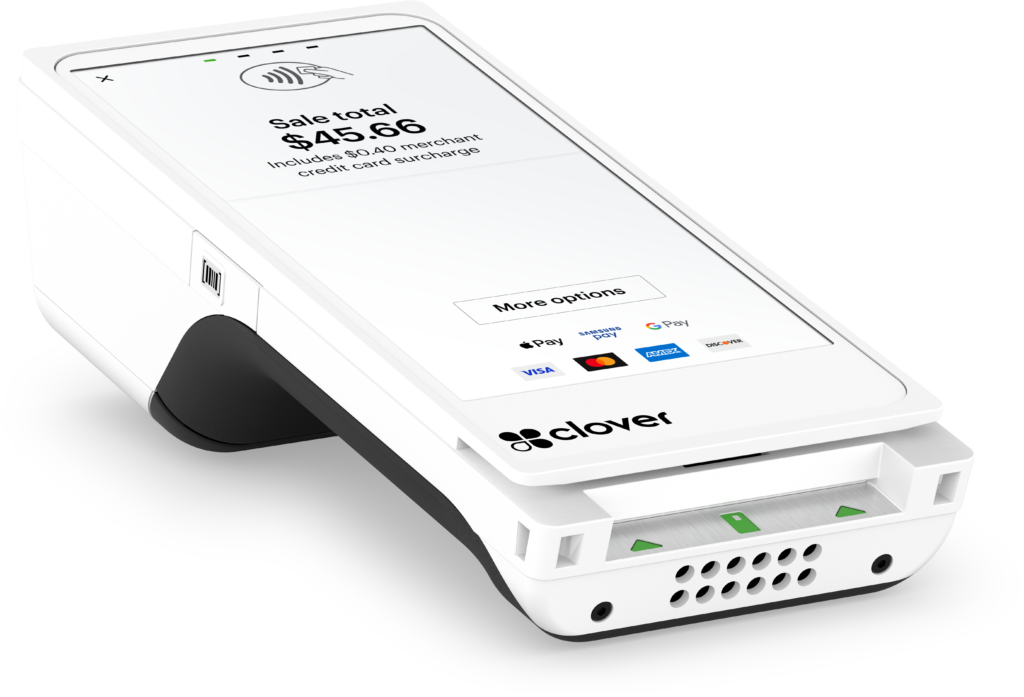
Bring checkout to your customer. Clover Flex 4 combines a handheld POS, payment terminal, receipt printer and barcode scanner in one portable device.
Take payments at the table, on the shop floor or away from a fixed counter—with the Clover software plan and connectivity your business needs.
Available through Clearly Payments in the U.S. Flex 4 is our primary model; limited Flex 3 stock may remain available. Clover is not currently offered by Clearly Payments in Canada.
Checkout that moves
Flex is useful when a fixed checkout slows down the interaction. It lets you bring payment acceptance and the tools in your chosen Clover plan to the customer, while keeping receipt printing in your hand.
Bring the payment terminal to the table instead of asking customers to walk to the counter. Check that your restaurant plan supports the ordering, tipping and table workflows you want.
Scan supported product barcodes and complete checkout on the shop floor. Item lookup and inventory workflows depend on your configured catalogue, software and apps.
Take the device to your customer when a fixed station is impractical. Check Wi-Fi or cellular coverage at the places you work, and plan access to charging.
Everyday capabilities
Hardware supports EMV chip, contactless and magnetic-stripe payments, with an on-screen PIN keypad. Customers can also tap supported mobile wallets, including Apple Pay and Google Pay. Enabled payment methods depend on your merchant account and configuration.
A built-in thermal printer gives customers a paper receipt without a separate counter printer. Keep spare paper on hand; compatible rolls are 58 mm wide, with a maximum 40 mm diameter.
The integrated 5 MP camera and dedicated scan button support 1D and 2D barcodes. The resulting item or transaction workflow depends on the Clover app you use.
Connectivity and power
Flex 4 connects over dual-band Wi-Fi or 4G LTE. LTE requires activated cellular service and carrier coverage. Bluetooth supports compatible, configured peripherals.
A rechargeable battery lets you move away from the counter. Recharge using the charging cradle or supported USB-C power. Keep a charging location within reach of your team.
Hardware reference
Specifications below describe Clover Flex 4.
| Display | 5.99-inch IPS touchscreen; 1440 × 720 pixels |
|---|---|
| Processor | Qualcomm 64-bit Arm Cortex-A53, quad-core, up to 2.0 GHz |
| Memory and storage | 4 GB RAM; 64 GB flash storage |
| Platform | Clover platform; published Flex 4 baseline is Android 13. Software updates and availability depend on Clover’s rollout. |
| Size | 186.6 × 82.5 × 54.8 mm (7.3 × 3.2 × 2.1 in), without sleeve |
| Weight | 480 g (about 1.1 lb) without sleeve; 540 g (about 1.2 lb) with sleeve |
| Battery and charging | Rechargeable lithium-ion, 16.6 Wh / 2,190 mAh; wireless charging cradle and supported USB-C charging |
| Connectivity | Wi-Fi 802.11 a/b/g/n/ac, 2.4 / 5 GHz; 4G LTE; Bluetooth 5.0; USB-C. Cellular activation, carrier and service charges depend on configuration. |
| Receipts | Integrated thermal printer; 58 mm paper width; 40 mm maximum roll diameter |
| Camera and scanning | 5 MP camera; dedicated scanning button; 1D and 2D barcode support |
| Payment interfaces | EMV chip, NFC/contactless, magnetic stripe and virtual PIN keypad; accepted methods depend on the merchant setup |
| Accessibility | 3.5 mm wired audio jack; TalkBack through the audio jack; passive stylus support; tactile PIN entry aid available. Confirm accessory inclusion and setup. |
Software and total cost
Choose the software plan and apps for the way your staff take orders, manage items, track sales and serve customers.
Basic payment acceptance, inventory, restaurant ordering, employee tools and reporting are not interchangeable requirements. Software capabilities vary by plan, business type and app.
For multiple devices or locations, confirm account structure, catalogue management and reporting before rollout. Check any required business integrations individually, including compatibility and extra fees.
There is no single Flex price or processing fee that fits every business. Ask for the full recurring and upfront cost, plus the agreement term.
Choose the right checkout
Start with where checkout happens. A portable device is useful for mobility; a dedicated counter station gives staff a larger, fixed workspace.
| Device | Best fit | Main consideration |
|---|---|---|
| Clover Flex 4 | Handheld, tableside and mobile checkout with built-in receipt printing | Small screen, battery and wireless coverage suit mobile tasks better than long counter sessions |
| Clover Mini | A compact, fixed countertop POS | Less portable; a better starting point when a larger counter screen or wired connection matters |
| Clover Station Duo | A dedicated checkout with merchant and customer-facing displays | More counter space and a fixed workstation rather than handheld mobility |
Your team needs to take payments where customers are, carry a receipt printer with them or scan items away from a fixed checkout.
Staff spend most of the day at one station, work with detailed orders on screen or need a larger checkout workspace. Flex can be part of a wider setup, subject to software and account compatibility.
Buyer questions
It combines payment hardware with the Clover software platform. It can serve as a handheld POS, but the tools available—such as item management, ordering or advanced reporting—depend on your software plan and apps.
Your quote should separate hardware, software subscriptions, processing fees, LTE service and optional apps or accessories. Monthly software and service charges depend on your setup. Clearly Payments provides an itemized quote for the complete setup.
Flex 4 supports Wi-Fi and 4G LTE. Cellular use needs activated service and carrier coverage. Confirm the carrier, data charges and coverage for your intended locations.
Yes. Flex 4 has an integrated thermal receipt printer and camera-based 1D/2D barcode scanning with a dedicated scan button. Scanning workflows depend on the app and catalogue setup. Flex Pocket is a different device and does not have the same built-in printer.
Clover describes at least eight hours under typical small-business use. Printing, scanning, apps, brightness and signal conditions affect runtime. Plan for charging during the working day.
Offline acceptance may be enabled for eligible configurations, subject to limits and settings. It does not verify funds in real time, and a stored payment may later be declined. Confirm the permitted workflow and merchant risk before relying on it.
No. Clearly Payments currently offers Clover only to U.S. businesses. Canadian merchants can explore our POS systems and payment terminals for other options. This describes Clearly’s offering, not Clover’s availability through other providers.
Flex 4 is the primary/current model we sell. Some Flex 3 units may remain available in limited quantities. The specifications on this page are for Flex 4; confirm the generation on your quote rather than applying these specifications to an older device.
Ask for the written hardware warranty, replacement process, support contacts and included accessories with your quote. Confirm whether your bundle includes the cradle, protective sleeve and any accessibility or travel accessories you need.
Keep exploring
Compare handheld and countertop approaches for U.S. merchants.
Explore Clover systems →Consider software, hardware and merchant workflows together.
Compare POS systems →Explore alternatives when payment acceptance is your main requirement.
View payment terminals →Talk through your setup
Tell us where you take payments, which software tools you need and how many devices you are considering. We’ll help you review the hardware, plan and processing arrangement.
Clover through Clearly Payments is available to U.S. businesses only.