
RECURRING PAYMENTS
Recurring Payments That Keep Billing Moving
Collect repeat payments automatically on an agreed schedule. Set up recurring billing in your browser or connect it to your software through APIs, with less manual work every billing cycle.
No setup fees. No long-term contracts. Real payment support, 24/7.
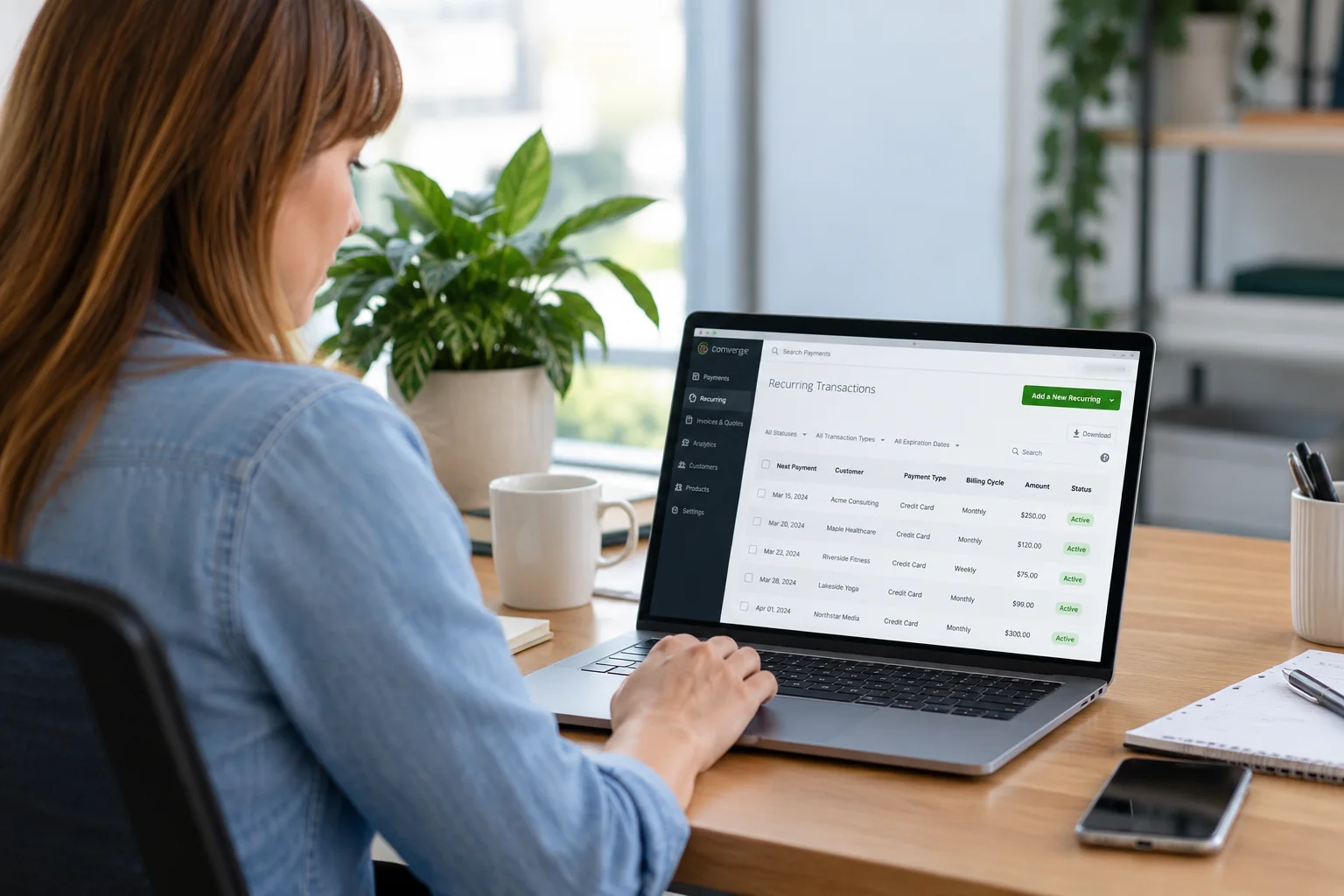
Set the schedule once. Stop entering the same payment again.
Recurring payments automatically charge an authorized payment method at agreed intervals. Instead of asking a customer to pay a new bill each time, you establish the amount, billing cycle and next payment date, then manage the schedule as the relationship changes.
Manage it in your browser
Create schedules, select customers and review upcoming payments through an online dashboard. No coding is needed to start collecting repeat payments.
Build it into your software
Use the recurring-payment API to create and manage schedules, work with payment tokens and connect transaction results to your billing workflow.
AMOUNT. CUSTOMER. SCHEDULE.
A repeatable workflow for repeat payments.
Create a plan around the customer agreement, then keep the payment details and schedule together. Review the confirmation to see the amount and next payment date. Each charge is processed when it falls due.
01 · Establish the payment agreement
Agree the amount, timing and cancellation terms with your customer. Create or select the customer and their secure payment profile.
02 · Choose the billing schedule
Set the amount, cycle and next payment date. For an instalment plan, define the number of payments.
03 · Let scheduled payments run
The system submits payments on scheduled dates. Each charge receives its own payment result.
04 · Review and manage
Track transaction history, review exceptions and update, suspend or stop the schedule when needed.
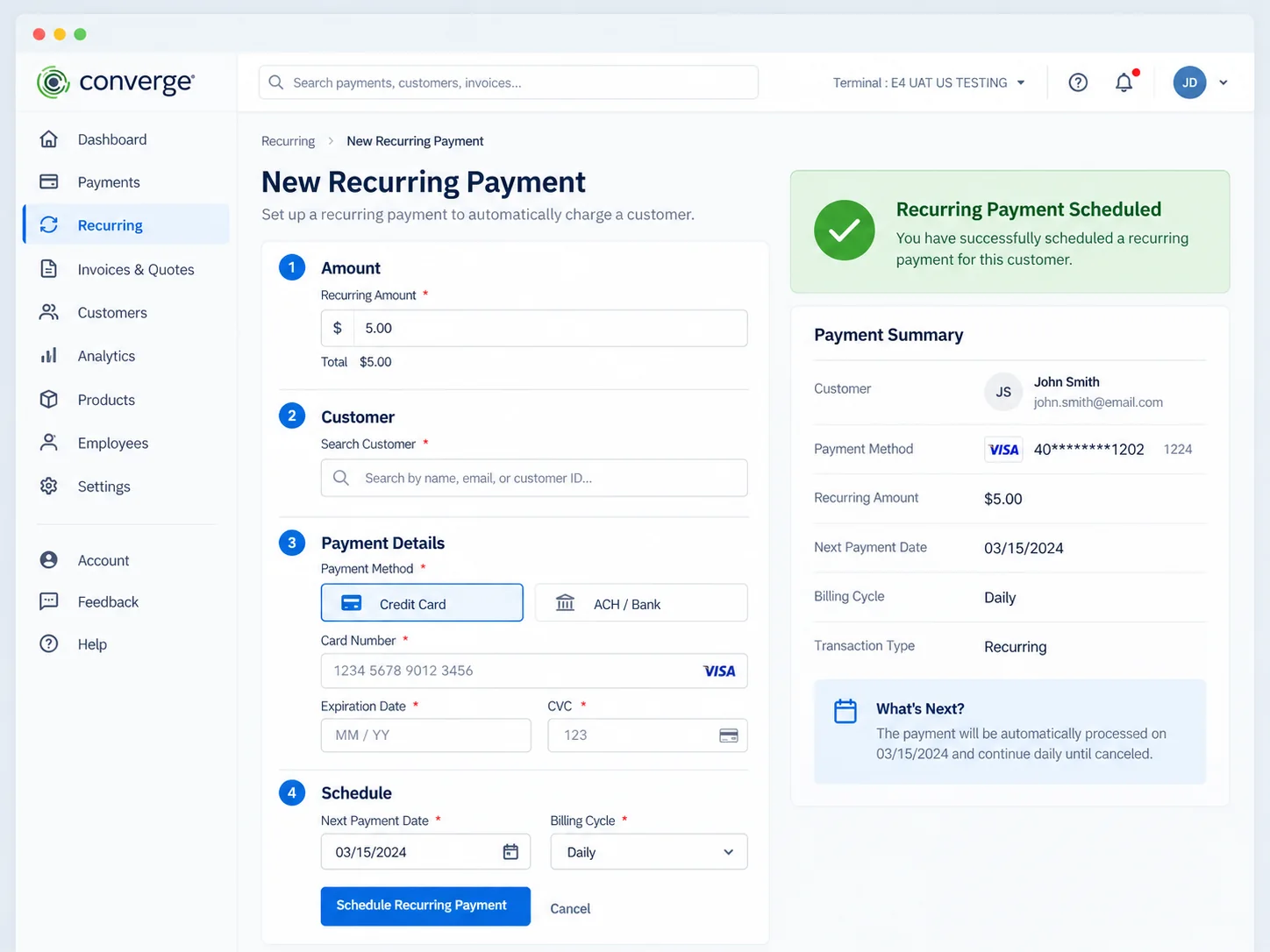
The setup view brings the amount, customer and schedule together, with a confirmation summary to review. View the full-size setup screen
Ongoing service or a defined payment plan?
Use the payment structure that matches what you sell. Recurring and instalment billing both automate collection, but they have different stopping points.
Recurring payments
Repeat charges continue on the agreed cycle until the schedule is changed, suspended or cancelled.
A practical fit for memberships, subscription services, retainers and ongoing maintenance.
Instalment payments
Split an agreed amount into a defined number of scheduled payments.
Give customers a clear payment schedule for tuition, staged services or an agreed balance, with a defined finish.
Choose daily, weekly, fortnightly, twice-monthly, monthly, quarterly or annual billing, with additional cycle options for your setup. Select a next payment date and use the available end-of-month settings to keep monthly billing aligned.
KEEP CONTROL AFTER SETUP
Know what is due. Find what needs attention.
See recurring customers, payment amounts, billing cycles and next payment dates in one working view. Search or filter the records instead of rebuilding your billing list each month.
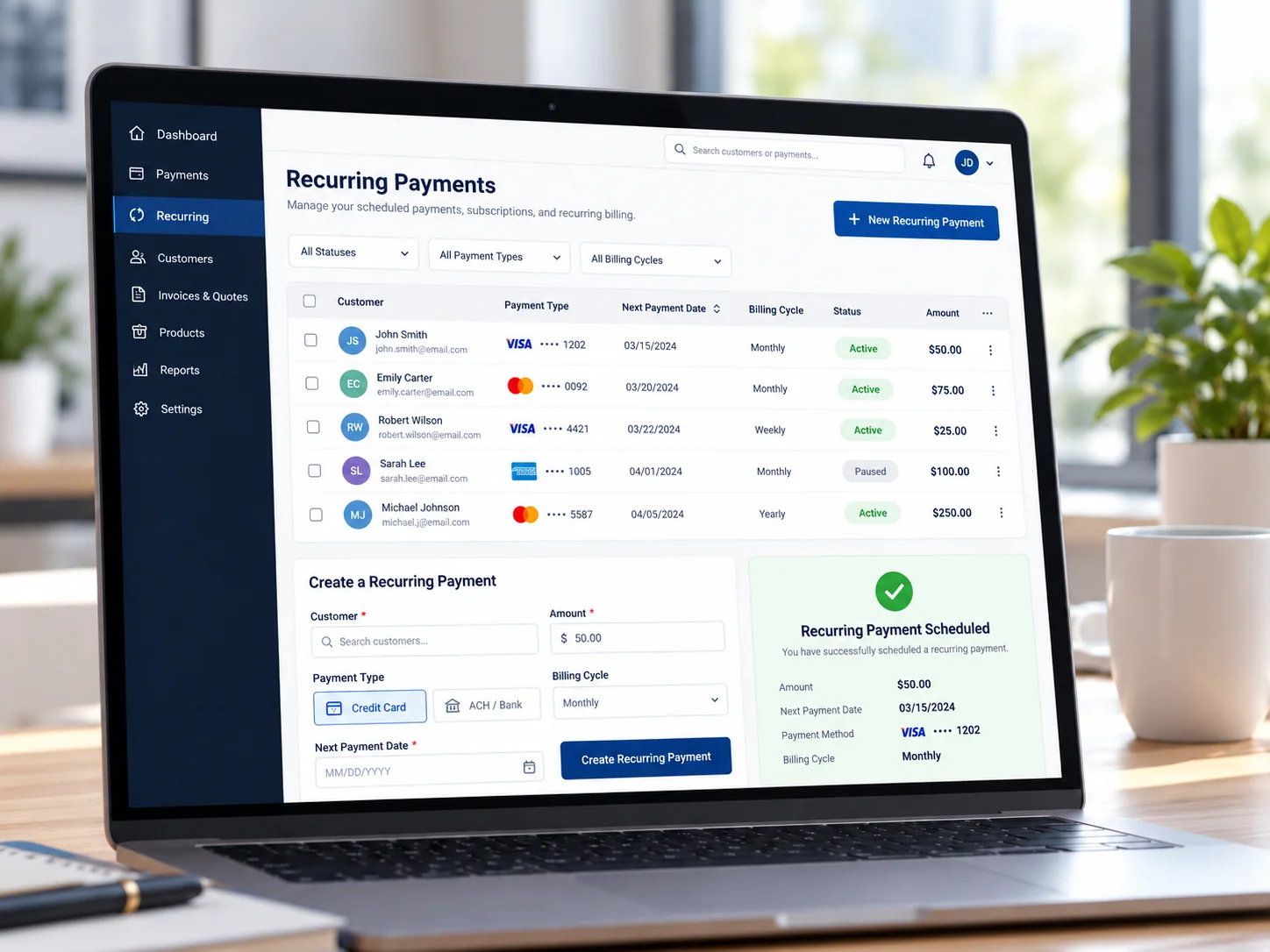
Change the plan as business changes
Update the amount, billing cycle or next payment date. Skip a payment, suspend a schedule and resume it when appropriate, or cancel future charges.
Keep customer details connected
Search existing profiles, add customers manually or import customer information through a secure setup. Use masked payment details to identify the right method.
Keep a usable payment history
Review completed transactions and payment outcomes. Download records for reporting and reconciliation, with API access for connected systems.
Keep customers informed
Configure email receipts, upcoming-payment reminders and declined-payment messages to support your billing process.
FOR SOFTWARE AND INTEGRATION TEAMS
Build recurring payments into your own software.
Your application can manage the billing relationship while Clearly handles payment processing. Create recurring or instalment records, update schedules and connect payment activity to your own customer experience.
Connect a SaaS product, CRM, ERP or billing system without asking staff to re-enter every payment plan. Use the dashboard for day-to-day operations alongside your integrated workflow.
Create and manage schedules
Create recurring or instalment records programmatically. Use their identifiers to update amounts, dates and cycles or remove a schedule.
Use tokenized payment profiles
Associate secure payment tokens with customer records so repeat billing does not require your application to keep raw card numbers.
Retrieve and reconcile activity
Query recurring records and transaction results, then connect those records to your own billing and finance processes.
Connect payment notifications
Use configured payment-result callbacks or export notifications to help keep your application aligned with processing activity.
Keep a failed payment from becoming invisible.
A schedule saves repetitive work, but it still needs an exception process. Declines, expired cards and closed accounts should be visible to the team responsible for collection.
Retry handling and clear outcomes
Recurring-payment processing includes retry handling for declined charges. Review unresolved payments and merchant notifications so your team can contact the customer and resolve the cause.
Fewer manual card updates
An optional account-updater service can refresh changed card numbers or expiry dates for participating Visa and Mastercard accounts. Availability depends on the card, issuer and account configuration.
Control the next charge
Suspend a schedule while resolving a payment issue. Update the payment details and billing cycle before resuming collection.
MORE THAN SUBSCRIPTIONS
Repeat payments for the work you do repeatedly.
An agreed schedule can make payment easier for customers and reduce the collection work your team repeats. Build the payment plan around the service, not the other way around.
Memberships and ongoing services
Collect regular membership fees, maintenance charges or subscription payments without sending the same payment request every cycle.
Retainers and service agreements
Keep agreed repeat billing connected to the client relationship. Explore professional-services payment workflows.
Donations, tuition and payment plans
Support authorized recurring donations or a defined instalment schedule. See nonprofit, government and education payments.
SaaS and connected billing
Let your application define the commercial relationship and use APIs to manage the payment schedule. Custom subscription rules stay connected to the software your team already uses.
A payment token, not another card-number spreadsheet.
Tokenized payment profiles let you collect authorized repeat payments without repeatedly handling raw card details. Clearly helps manage PCI compliance and the security of your payment setup.
Protected payment credentials
Keep payment credentials in the secure payment environment. Staff use masked details and customer profiles to work with the correct record.
Controlled staff access
Give authorized team members access appropriate to their role. Keep billing administration separate from unnecessary access to account settings.
The right integration design
Clearly helps choose a secure collection and tokenization approach for your application. Integration design affects PCI scope; card security codes are never retained after authorization.
Choose how the next payment should happen.
Recurring Payments
Use when an agreed charge should repeat automatically on a schedule.
Invoicing
Use when you need to send a specific bill or payment request and track its status.
Virtual Terminal
Use when your staff should enter a one-time remote or phone payment.
Hosted payment page
Use when customers should open a secure payment form and enter their own details.
For a customer buying once through an online store, use eCommerce payment processing. Recurring billing adds an agreed repeat-payment schedule to the customer relationship.
CLEAR COSTS. PRACTICAL HELP.
Less collection work. A clear payment setup.
Your recurring-payment quote accounts for processing volume, card mix, payment method and platform setup. It explains processing charges, any recurring-feature or account fees and API or integration work.
Scheduled card payments are card-not-present transactions, so their underlying costs can differ from in-person chip and tap payments. Cost Plus pricing separates interchange and network costs from Clearly’s disclosed markup.
Get a Recurring Payments QuoteFunding that follows processing
Same-day or next-day funding is available for eligible accounts. Timing depends on processing cut-offs, settlement and banking days. A future scheduled charge is funded after it processes, not when the plan is created.
Support for setup and the ongoing work
Get help configuring schedules, customer records, email settings and reporting. Clearly supports secure migration planning and API integration, with real payment support available 24/7.
International customers and currency options
Accept international cards and access more than 70 currency options through the appropriate currency-conversion setup. Clearly matches the card acceptance, currency and settlement arrangement to your account.
Your merchant account provides the processing and funding foundation. No-code browser management and API access can be part of the same payment relationship.
Questions before you automate your billing?
What are recurring payments?
Recurring payments charge an authorized payment method automatically on an agreed schedule. They suit ongoing services, memberships, subscriptions and other repeat-billing relationships.
How do I set up recurring credit card payments?
Establish the customer’s agreement, select or create their payment profile, enter the amount and choose the billing cycle and next payment date. Review the confirmation and manage the schedule through the dashboard or API.
Do I need a developer to use recurring billing?
No. Your team can create and manage schedules through the browser interface. API access is available when you want recurring-payment functionality connected to your own application.
Can I use an API for recurring payments?
Yes. APIs support recurring and instalment records, schedule updates, payment tokens and transaction queries. Clearly helps scope the integration, credentials, testing and payment notifications for your workflow.
What is the difference between recurring and instalment payments?
Recurring payments continue on the agreed cycle until changed or cancelled. Instalment payments use a defined number of payments for a planned collection schedule.
Can I change, pause or cancel a payment schedule?
Yes. Update the amount, billing cycle or next payment date, skip a payment, suspend the schedule or stop future charges. Resume a suspended schedule after the relevant details have been updated.
What happens if a recurring payment fails?
Review the payment result and any retry or merchant notifications. If a payment remains unresolved, contact the customer, update their payment information and manage the schedule before the next collection. Each scheduled charge receives its own authorization result.
Can expired card details be updated automatically?
An optional account-updater service can refresh eligible Visa and Mastercard card details supplied by participating issuers. Clearly explains availability and setup for your account.
Are recurring payments secure?
Tokenized profiles and masked payment details support repeat collection without keeping raw card numbers in your own customer notes. Clearly helps manage PCI compliance and secure setup. Card security codes are not retained after authorization.
How do I track recurring transactions?
Review customers, amounts, next payment dates, billing cycles and status in the dashboard. Use transaction history, downloads and API queries to support reporting and reconciliation.
How much does recurring payment processing cost?
Pricing depends on volume, card mix, account and platform configuration, plus any integration requirements. Your quote identifies processing charges and applicable platform or feature fees.
When are recurring payments deposited?
Each successful scheduled transaction follows your account’s settlement and funding schedule. Same-day or next-day funding is available on eligible accounts, subject to cut-offs and banking days.
Put your next billing cycle on a better schedule.
Tell us how you collect today and what you want to automate. We will help configure your recurring-payment setup, explain your pricing and connect the right tools.