Clearly Payments Dark Logo

MOBILE PAYMENTS

Mobile payment processing wherever business happens

Take card payments at a customer’s door, around your business or at an event. Clearly Payments brings together mobile readers, wireless terminals and portable POS, with a setup that fits how you work.

Get a Quote

No long-term contracts. No cancellation fees.

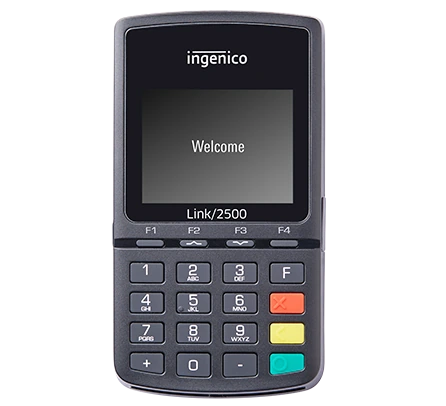
Link 2500 Payment Terminal with Clearly Payments

Reader + app

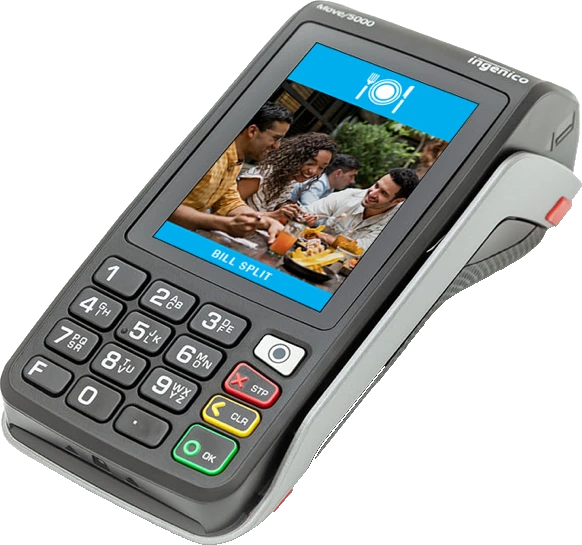
Ingenico Move 5000

Wireless payments

Choose how you take payments on the move

A mobile reader, wireless terminal and portable POS all accept in-person payments away from a fixed counter. The best fit depends on whether you want to use your phone, print receipts and manage the sale as well as the payment.

Link 2500 Payment Terminal with Clearly Payments

Mobile reader + app

Best for: Field services, pop-ups and mobile professionals.

Keep the setup light. Pair Link/2500 with the configured Converge Mobile or talech Mobile app, then let your customer tap or insert their card on the reader.

Requires: Supported phone/tablet, app and reader
Connection: Bluetooth to the app
Receipts: Digital; no built-in printer
Advantage: Compact equipment you can carry easily

Discuss a Mobile Reader
Ingenico Move 5000

Wireless payment terminal

Best for: Tableside payments and roaming staff.

Take Move/5000 around your business or to a customer location. Get a dedicated terminal experience without depending on your personal phone, with a printed receipt on the spot.

Requires: Configured terminal and network service
Connection: Wi-Fi or cellular
Receipts: Built-in printer
Advantage: Independent payment device

Explore Move/5000
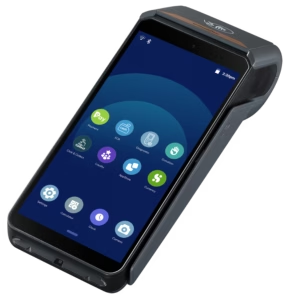
Axium DX8000 smart payment terminal

Dedicated smart terminal

Best for: Merchants who want handheld checkout without a phone or tablet.

Want a dedicated wireless smart terminal? The AXIUM DX8000 combines a touchscreen, payment acceptance and a receipt printer with supported on-device applications. Use it on its own or within a broader POS setup.

Requires: Configured payment software, processing and connectivity
Phone/tablet: Not required for checkout
Receipts: Built-in printer
Advantage: A dedicated portable payment device

Explore AXIUM DX8000

A mobile card reader is part of a complete payment setup

The Link/2500 handles chip, PIN and contactless card entry. Your phone or tablet runs the payment app and provides its internet connection. Its rechargeable battery and compact design make it easy to carry; the reader does not have a built-in receipt printer.

Link/2500 + Converge Mobile

Use a compatible iPhone, iPad or Android phone or tablet to enter a sale, calculate the amount and send the payment to the Bluetooth reader. Converge Mobile connects mobile acceptance with the Converge payment account, transaction reporting and customer receipts.

Link/2500 + talech Mobile

Use the configured talech Mobile app for a mobile sales and payment workflow. Enter the sale in the app, take the card payment on the paired reader and send a digital receipt. Choose the app and reader together with Clearly so the software, country and merchant account match.

Accept credit cards, configured debit payments and contactless wallets such as Apple Pay and Google Pay. Clearly configures the reader, app and payment account together. Bluetooth connects the reader to your device; Wi-Fi or cellular data connects the app to processing.

Need a device that works without your phone? Compare the payment terminal options. Need order, product and broader business tools? Explore point-of-sale systems.

From a payment on the move to money in your account

01

Take the sale to your customer

Enter the amount in the mobile app, on the wireless terminal or through the portable POS. Your customer taps or inserts their card and enters a PIN when required.

02

Confirm payment and send the receipt

The payment is sent for authorization. Check the result before completing the sale, then send a digital receipt or print one with the selected terminal setup.

03

Track the payment and your deposit

Review transactions in your payment reporting. Get same-day or next-day funding with eligible merchant accounts, using your existing business bank account. We explain your funding schedule during setup.

Take payments where the work happens

Get paid before leaving the job

Trades, field services and delivery teams can collect payment at the customer location instead of waiting to collect later. Choose the app and reader for compact carrying, or a wireless terminal for a dedicated device and printed receipt.

Keep a pop-up or event moving

Take payments at markets, temporary counters and events without building a permanent checkout. Plan the connection and battery charging around where you sell, then keep the payment process simple for staff.

Bring payment to the table

Collect payment where the customer is sitting. A wireless terminal suits payment acceptance; portable POS adds the order workflow. Explore restaurant and hospitality payments for the wider setup.

Open another checkout where you need it

Serve customers in the aisle, at curbside or during a busy period. A mobile setup gives staff another way to complete the sale without sending every customer back to a fixed counter. See retail payment options.

Know the cost of your mobile payment setup

Compare the full setup, not just the reader price. Clearly separates equipment, payment processing and any app, software or connectivity charges so you can choose around your sales volume and day-to-day work.

Reader, terminal and software costs

Buy or rent the right equipment. A phone-connected reader uses a compatible device you already own; a wireless terminal or portable POS provides its own payment hardware. We confirm the app or POS plan, receipt options, connectivity and setup costs in your quote.

Merchant account and processing fees

Your device needs a merchant account and payment processing. Card-present and manually keyed transactions can have different costs. Choose the payment method around how the customer pays and compare Clearly’s pricing options against your transaction mix.

Already accepting payments? Get a payment-cost analysis of your current statement. We can also check compatible existing equipment before recommending a replacement.

The right mobile setup, backed by Clearly

Keep your team taking payments instead of troubleshooting the connection between an app, a reader and a processing account. Clearly helps choose and configure the combination, train your team on the payment workflow and support the equipment after launch.

Help when a payment device needs attention

Get 24/7 payment support, setup assistance and help arranging replacement equipment. We check the device, software and connection together so your staff have a clear next step.

Protect payments without adding work at checkout

Use encrypted card entry, EMV chip and contactless acceptance. Tokenized stored-card features keep reusable payment credentials separate from the raw card details. Clearly helps configure payment security and supports your PCI compliance requirements for the selected setup.

Transparent processing costs. No long-term contracts or cancellation fees. Get a setup that fits how your business takes payments, with custom email receipts, useful transaction reporting and support for repeat customers.

Mobile payment questions

What is a mobile payment terminal?

It is a device used to accept in-person card payments away from a fixed checkout. A phone-connected reader uses an app on your phone or tablet. A wireless terminal handles payment on its own device. Portable POS adds a sales workflow such as orders and product management.

Can I accept tap, chip and debit payments with Link/2500?

Link/2500 supports contactless, chip and PIN card entry, including compatible mobile wallets. Debit acceptance and enabled payment methods are configured for your merchant account and market. Clearly matches the reader and payment app to that setup.

Does a mobile card reader need Wi-Fi or cellular service?

The reader pairs with your phone or tablet over Bluetooth, while the app needs an internet connection through Wi-Fi or cellular data. A wireless terminal uses its configured network connection instead. Tell us where you will take payments so we can recommend the right connection.

Can I use Link/2500 with Converge Mobile or talech Mobile?

Link/2500 has supported configurations with both apps. The reader version, app, device and merchant account must be matched together. Clearly configures the appropriate combination; changing apps is not simply a matter of pairing the same reader again.

Can I print a receipt?

Link/2500 has no built-in printer and the mobile app provides digital receipt options. Move/5000 and AXIUM DX8000 have integrated receipt printers. Tell us if printed receipts are important so the quote includes the right device or compatible receipt setup.

How quickly do mobile payments reach my bank account?

Get same-day or next-day funding with eligible merchant accounts. The schedule depends on the account, transaction timing and banking arrangements. You can use your existing business bank account, and Clearly explains the deposit schedule during setup.

What if I need to take a payment over the phone?

For staff-entered remote card payments, explore the Virtual Terminal. It is a different workflow from accepting a customer’s card in person on a mobile reader. Clearly can help combine the payment channels your business needs.

Find the mobile payment setup that fits your business

Tell us where you sell, whether you want to use your phone and what staff need to do beyond taking payment. We’ll help you choose the reader, wireless terminal or portable POS and explain the full cost.

Get a Mobile Payments Quote

Or call 1-800-818-1402.